Code Encryption
Assemblies compiled using the .NET framework contain MSIL (Microsoft Intermediate Language) instructions that are executed by the .NET runtime just-in-time compiler when your application is run on the user machine. The just-in-time compiler converts the MSIL instruction to native machine instructions which are then processed by the machine. The MSIL instructions, together with class, methods, fields and other metadata information available inside a compiled assembly makes it possible for tools like .NET reflector, dotPeek and JustDecompile to translate the code back to its source language (C#, VB or any other .NET language).
Symbol renaming doesn't modify the MSIL instructions at all, it only changes the names of classes and methods but leaves the MSIL instructions untouched. In fact, symbol renaming doesn't offer a good solution for guarding software against unauthorized distribution. Even if symbols are renamed a hacker could still identify where license validation takes place and simply patch the assembly to circumvent license validation altogether.
By applying code encryption you make it significantly more difficult for someone to read your code and modify your assembly. Agile.NET encrypts the MSIL code and keeps it in a secure storage. When the assembly is loaded, Agile.NET binds to the .NET runtime engine and manages decrypting the MSIL on a per-method basis. Agile.NET creates a runtime environment that executes the original MSIL code by decrypting one method at a time. This important capability minimizes the exposure of MSIL code in memory and thus prevents dumping the code from physical memory.
Native Runtime Components
Code encryption adds a native component that has to be shipped together with the encrypted software. The native component binds to the .NET runtime and takes control of method execution. Agile.NET supports both x86 and x64 platforms by adding an x86 version as well as an x64 version of the runtime component. By default, Agile.NET embeds the runtime components directly into the encrypted assembly. In this case there is no need to add the runtime components to the deployment package explicitly. If you prefer to deploy the runtime components separately, you can do so by checking the Disable runtime embedding option in the options dialog.
Seamless Integration
Code encryption is easy to integrate with existing software. While symbol renaming may introduce errors due to the use of reflection APIs in your code (and therefore may require additional configuration), code encryption is not expected to introduce such errors.
Using Code Encryption
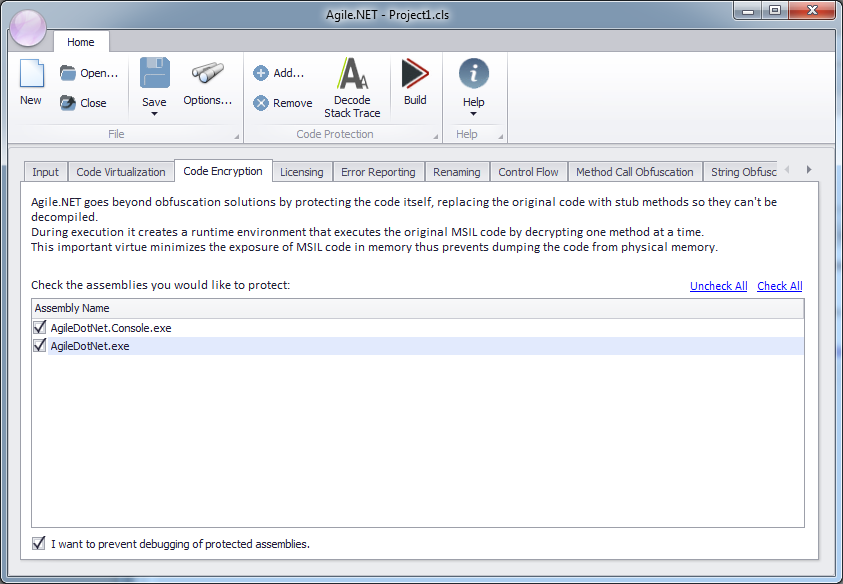
To enable code encryption:
- Select the Code Encryption tab.
- Check the assemblies you want to apply code encryption to.
- Optionally, check the I want to prevent debugging of protected assemblies option. Agile.NET will then add an additional layer of protection that prevents any debugging attempts of your software once it is installed at a customer site. Any attempt to attach a debugger to a protected assembly will cause the application to terminate. Component developers should avoid using this option, as it will prevent developers using their protected components from debugging their own code. This option increases the size of the Agile.NET runtime DLLs, so it is recommended to disable runtime embedding if you decide to use anti-debugging with encrypted assemblies.